Custody calendar for co-parents - One pattern, the whole year - No account
AlternateOne pattern. The whole year. Both of you.
Alternate is a custody schedule app built for the way separated parents actually use one: open it, glance at Today, close it. You pick the pattern that matches your arrangement - week on / week off, 2-2-3, every other weekend with a midweek evening, 2-2-5-5, 3-4-4-3, or a 14-day cycle you build yourself - tell it when the next block starts and who has the children that day, set the handoff time, add first names, and the year is generated. On iPhone 15 Pro and later you can paste the schedule section of your parenting plan instead and confirm the pattern Alternate reads from it, entirely on your phone. Today shows whose day it is, which children are with them, and when the next handoff is, followed by the next two weeks one day per line. Schedule is a swipeable week strip over a plain list, with a note column for the reason a day is different - "Emily is on a work trip" - and a Next handoff button that jumps as far ahead as it needs to. Holidays and exceptions layer on top of the pattern and can repeat every year or alternate years. A swap is a request with an optional day in return and a short note; your co-parent sees exactly what would change before accepting, both calendars update, and an unanswered request expires at 8 PM the evening before so nothing is left hanging. Count lists days with each parent by month and year, as counts rather than shares. Export writes the next twelve months into an "Alternate" calendar in Apple Calendar without duplicating events on re-export, or shares a standard .ics file for Google Calendar, Outlook, a school or a grandparent. Your co-parent joins by scanning a QR code or tapping a link; they do not pay and they do not need an account. Siri answers "who has the children?" and "when is the next handoff?" without opening the app. Siblings can follow different patterns. An assistant seat lets someone who manages your diary keep the schedule for you, with "Acting for" shown on everything they change. Free covers setup, pairing, one child and the next 60 days; one subscription unlocks the full year, holidays and exceptions, swaps, export and the assistant seat for the whole household. Both parents are kept visually equal on purpose, there are no streaks or celebrations, and nothing you do in it is tracked.
Custody calendar appCo-parenting appCustody schedule app2-2-3 scheduleWeek on week off calendarParenting plan calendarCustody swap trackerNo account
1 patternbuilds the whole yearPick week on / week off, 2-2-3, every other weekend with a midweek evening, 2-2-5-5, 3-4-4-3 or your own 14-day cycle, say when the next block starts and who has the children, and every handoff through next summer is on the calendar.
$0for your co-parent, alwaysThey scan a QR code or tap a link, add their name, and see the same schedule you do. No account, no email, no purchase button for a household they did not create. One subscription covers everyone in it.
0ads, analytics or trackersNo advertising, no analytics SDKs, no tracking across apps. Your household’s schedule syncs between its members and nowhere else, and children are first names on a schedule, not users.
Lifestyle
A calendar that does not keep score
Alternate started with a spreadsheet: a custody calendar rebuilt every January by an executive assistant so that one parent would never again be wrong about whose week it was. The obvious version of the app - a "family organiser" with photo feeds, comments and a kids dashboard - was cut early, and on purpose. Everyone who opens a custody app is in some stage of a separation. Some are amicable, some are in a court process, and some are opening it at eleven at night before a handoff they are dreading. What is left should not try to be fun. It should be calm, neutral and quick. That register shapes every decision. Neither parent’s colour is allowed to read as winning: no warm-versus-cool pairings, no filled-versus-outlined, and a picker that greys out any second colour too close to the first. There are no streaks, no confetti on an accepted swap, and no percentages of parenting time - Count shows integers because a spreadsheet does. The word "family" does not appear in the app, because the users’ family is the thing that changed shape; the app deals with a schedule. The co-parent’s join path shows them the schedule first and never shows them a purchase button for a household they did not create, because an invite that feels like a sales pitch turns the payer’s app back into a private spreadsheet. A day is never edited directly - only its source is, whether that is the pattern, an exception or an accepted swap - so the calendar stays honest and a single line under any day says why it is the way it is. The assistant seat exists because the original household had one, and the day sheet’s "added by" line is the whole audit trail. And the disclaimer is short and true: Alternate is a scheduling tool. If anything in it disagrees with your court order, your order is what counts.
Key features
What Alternate does
01
Today, in one glance
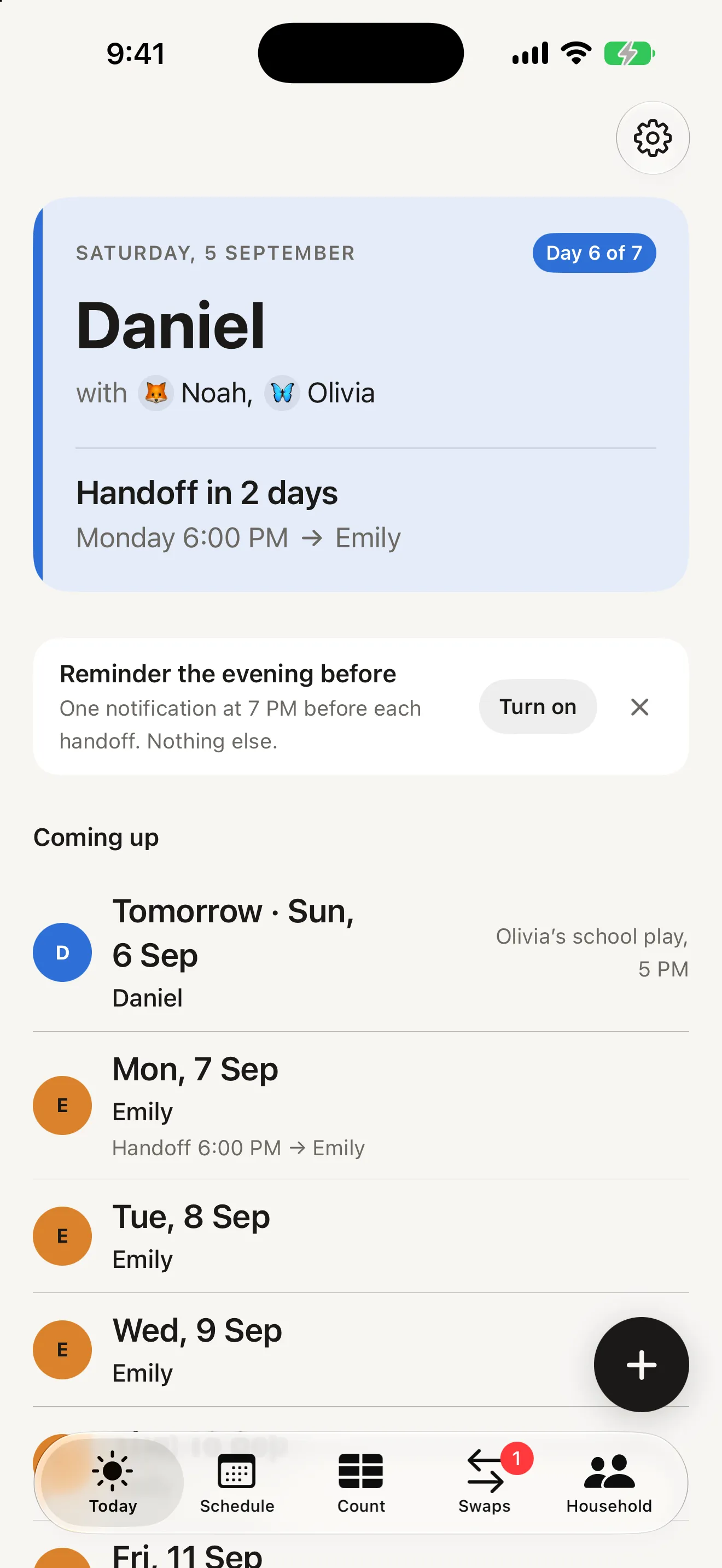
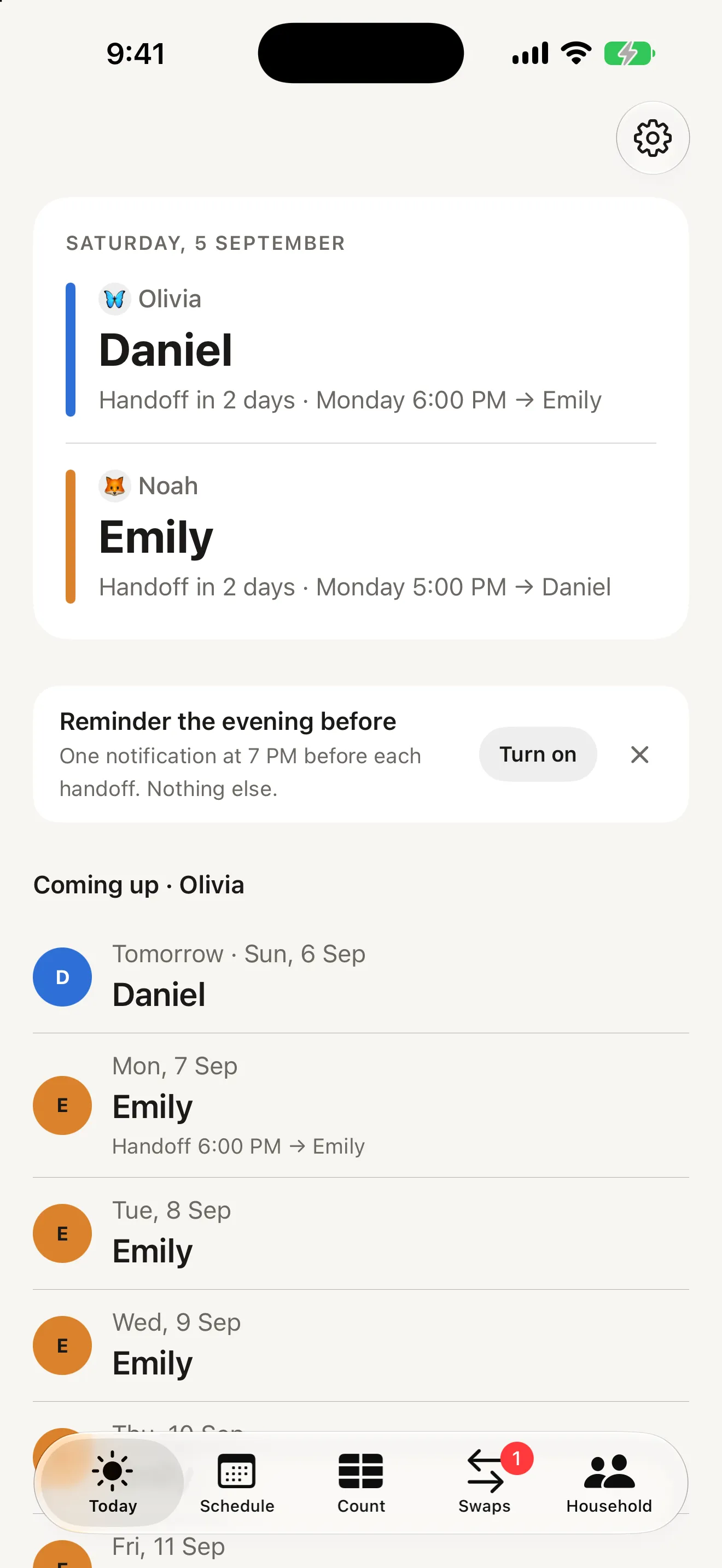
The first thing you see is whose day it is, which children are with them, and when the next handoff is - "Handoff in 2 days · Monday 6:00 PM → Emily". A chip says where you are in the current run, and "Coming up" lists the next two weeks one day per line, with handoffs and notes inline. Most sessions are open, glance, close.
02
Set your pattern once
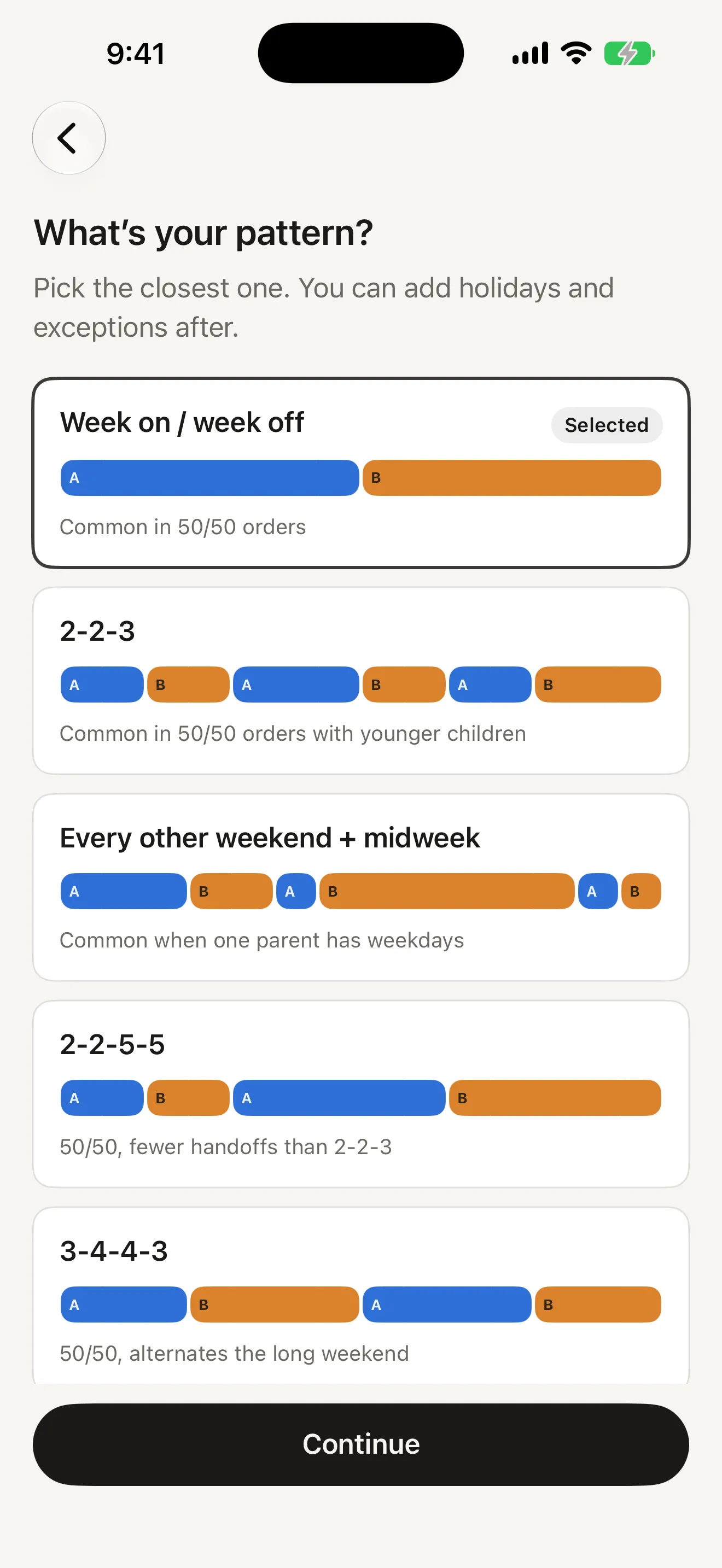
Large cards each show the pattern as a strip of coloured blocks so you can see it before you choose it: week on / week off, 2-2-3, every other weekend plus a midweek evening, 2-2-5-5, 3-4-4-3, or build your own 14-day cycle. Tell Alternate when the next block starts and who has the children that day, and the whole year is generated. Under 90 seconds from install to your own schedule.
03
A schedule anyone can read
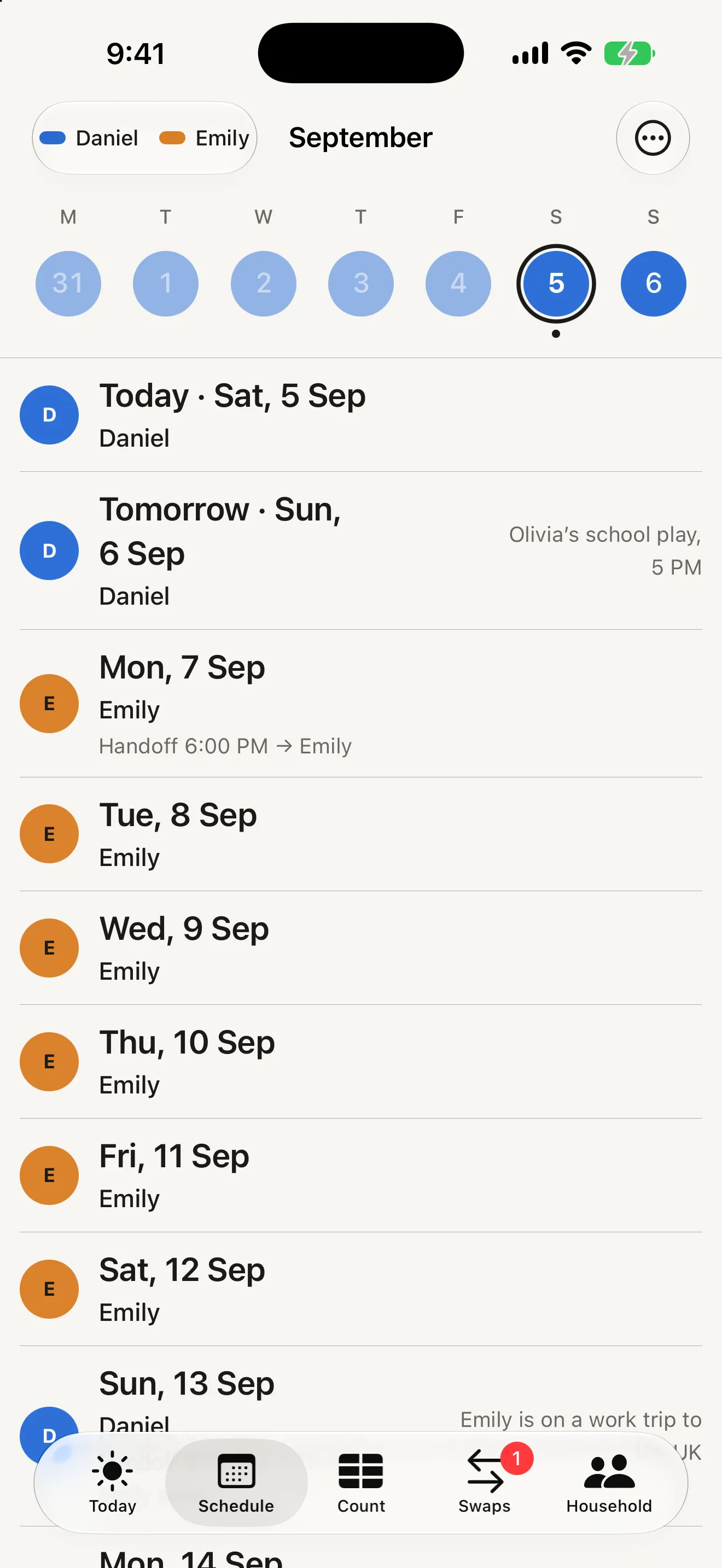
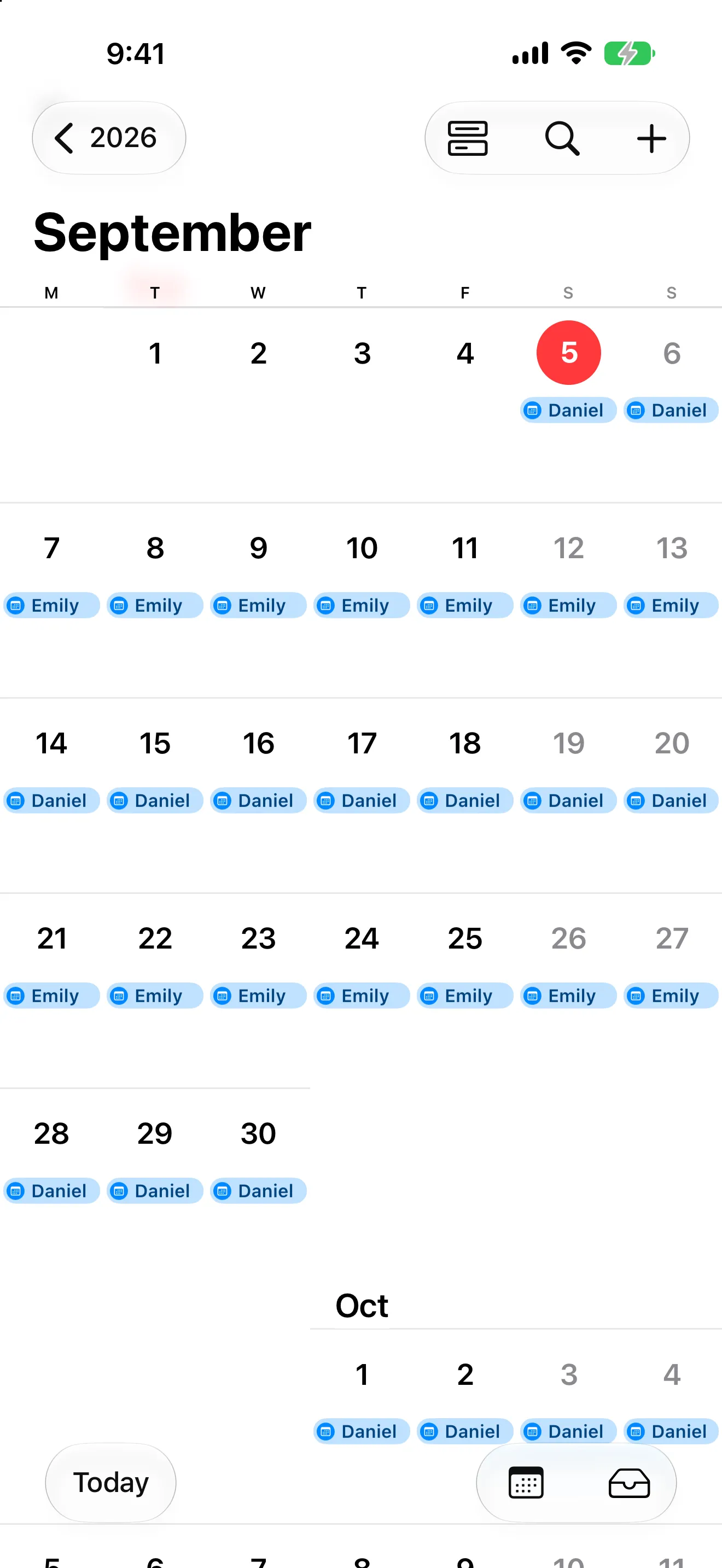
A swipeable week strip over a plain list - the date first and biggest, the parent’s name beneath, a third line when something happens, and a right-hand column for the reason: "Olivia’s school play, 5 PM", "Emily is on a work trip to the UK". Tap the month name to jump to December or next spring; tap Next handoff to move to the next day the children change parent, however far ahead that is. Prefer the colour-band grid? It is one toggle away.
04
Holidays and exceptions on top
Eid, Christmas, the summer block, a grandparent’s birthday: add a name, a day or a range, who has the children, and whether it repeats every year or alternates years. Exceptions sit on top of your pattern without touching it, and an accepted swap beats any exception. A note - one day or a range - explains a day without changing it, and both of you see who wrote it.
05
Swaps: a request and a tap
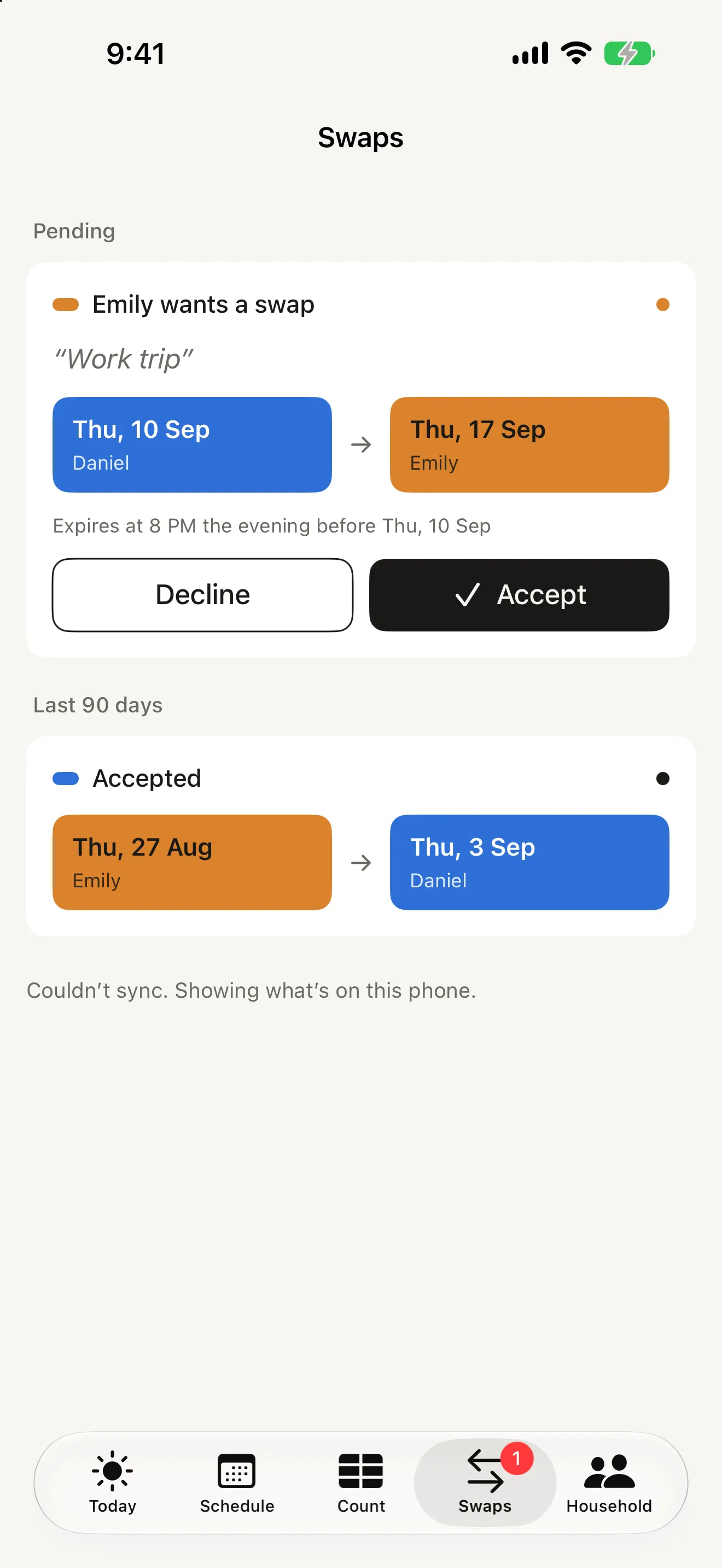
Tap a day, pick the one you are giving and optionally the one you would like back, add a short note - "Work trip" - and send. Your co-parent sees the two dates side by side in the colours they would become, then Accept or Decline. Once accepted, both calendars update and the record is final. Requests nobody answers expire at 8 PM the evening before, so nothing is left hanging.
06
Count, not score
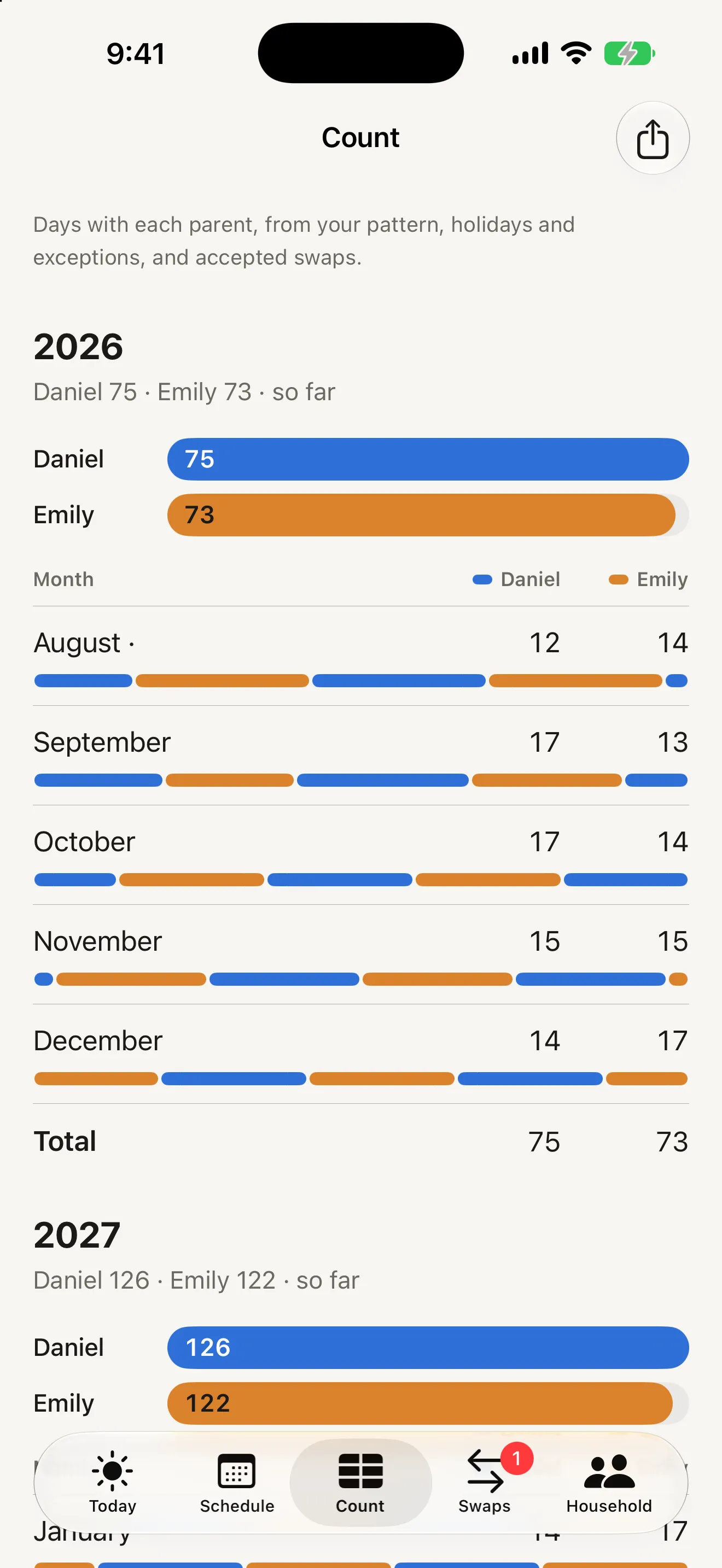
Days with each parent, month by month and for the year, drawn from the pattern, holidays, exceptions and accepted swaps. They are counts, not shares - integers in a table with the month’s rhythm drawn beneath each row, and no percentages anywhere. Tap a month or a year to see its days one per line, or share the table as plain text.
07
Export to the calendar you already use
Add to Apple Calendar writes the next twelve months into a calendar called "Alternate" on your phone, and re-running it after any change replaces the earlier copy rather than duplicating it. Share .ics file gives you a standard calendar file for Google Calendar, Outlook, the school, a grandparent or a nanny.
08
Siblings on different schedules
If one child follows a different plan - an older child on 2-2-3 while the younger stays week on / week off - give them their own pattern. Today shows a row per child, Schedule and Count get a switch between them, holidays and swaps can be aimed at one child or all of them, and the calendar export names each event for the child. A one-off sleepover does not need a pattern at all: add the exception and tick the child’s name.
Who it's for
When people reach for Alternate
The 11 PM "is the 21st mine?"
Open Alternate, read Today, answer in three seconds. The next two weeks are listed underneath, and Siri will tell you without opening the app. The most common session is a glance, and the app is built so that glance is always right.
The co-parent who will not "cooperate"
You do not need their permission to start. Set your pattern, get your year, and send the QR when you are ready. When they join, they see the schedule first - no paywall, no "your co-parent has invited you to upgrade" - and the calendar becomes shared instead of private.
Retiring the spreadsheet
For the parent, or the assistant, who rebuilds the custody calendar every January: set the pattern, add the school holidays as exceptions, and export twelve months into Outlook or Apple Calendar. Re-export after any change and it replaces the earlier copy.
Pricing
What Alternate costs
Free
$0
no account, no ads, no time limit
Set your pattern or paste your plan
Today: whose day it is and the next handoff
The next 60 days on Schedule and Count
Pair with your co-parent - they never pay
One child
Siri answers, handoff reminders
No ads, no analytics, no tracking
Recommended
Household
$29.99
per year, or monthly - one subscription covers your whole household
The full twelve-month schedule
Holidays and exceptions, yearly or alternating
Swap requests with automatic expiry
Add to Apple Calendar and .ics export
The assistant seat
Everything in Free included
One parent subscribes; nobody pays twice
Restore Purchases on any device
Guides & resources
Alternate guides
Step-by-step answers to the questions people ask most about Alternate.
You set your custody pattern once - week on / week off, 2-2-3, every other weekend with a midweek evening, 2-2-5-5, 3-4-4-3, or your own 14-day cycle - and tell Alternate when the next block starts and who has the children that day. It generates the calendar for the whole year. Holidays and exceptions layer on top, accepted swaps beat both, and Today always shows whose day it is and when the next handoff is. If the anchor date or the starting parent is wrong, change either in Household › Edit pattern and the entire calendar regenerates.
Does my co-parent have to pay or create an account?
No. Go to Household › Invite co-parent and show them the QR code or send the link. They install Alternate, scan or tap, add their name, and see the same schedule you do. There is no account, no email and no password for anyone. One subscription unlocks the household for everyone in it; nobody pays twice, and your co-parent is never shown a purchase button for a household they did not create.
Which custody schedules does it support?
Week on / week off, 2-2-3, every other weekend plus a midweek evening, 2-2-5-5 and 3-4-4-3 are built in, each drawn as a strip of coloured blocks so you can see it before you choose it. "Build my own" opens a 14-day strip you tap to set each day. Anything more irregular is handled by exceptions on top of the pattern - a summer block, an alternating-year holiday, a one-off weekend. Siblings can each follow a different pattern.
Can I paste my parenting plan instead of picking a pattern?
On iPhone 15 Pro and later running iOS 26 with Apple Intelligence turned on, yes. Paste the schedule section of your plan and Alternate reads it on your phone - nothing is sent anywhere - then shows you the pattern it found as the same block strip. You confirm before anything is saved, and if it gets it wrong you pick the pattern manually. On other devices the option is simply absent and everything else works the same.
How do swaps work?
Tap any day on Schedule and choose Request swap. Pick the day you are giving, optionally the day you would like in return, add a short note and send. Your co-parent gets a notification and sees exactly what would change - the two dates side by side in the colours they would become - before accepting or declining. Once accepted, both calendars update. An accepted swap cannot be undone; if plans change again, request a new one. Requests that are not answered expire automatically at 8 PM the evening before the swap date.
What are holidays and exceptions?
Exceptions sit on top of your pattern. Each has a name ("Eid al-Fitr", "Summer block"), a single day or a range, which parent has the children, and whether it repeats never, every year or alternating years with a chosen starting parent. If two overlap, the higher priority wins, and an accepted swap beats any exception. Three example exceptions are added when you start so you can see how they work; edit or delete them.
Can I export the schedule to Apple Calendar or Google Calendar?
Yes. Schedule › Export has two options. "Add to Apple Calendar" writes the next twelve months into a calendar called "Alternate" on your phone, and re-running it after any change updates the existing events rather than duplicating them. "Share .ics file" gives you a standard calendar file for Google Calendar, Outlook, or anyone who should see the schedule - a school, a grandparent, a nanny. If you use Apple Calendar, use the direct option rather than importing the file, because manual imports into Apple Calendar create duplicates.
Is Alternate free?
Setting up, pairing with your co-parent, adding one child and seeing the next 60 days are free with no time limit. One subscription - monthly or yearly - unlocks the full twelve-month schedule, holidays and exceptions, swap requests, calendar export and the assistant seat for your whole household. One parent subscribes; nobody pays twice. It renews until you cancel it in Settings, and if it lapses the household goes back to the free 60-day view with your holidays and accepted swaps kept exactly as they were.
Can Siri tell me whose day it is?
Yes. "Hey Siri, who has the children in Alternate?" and "Hey Siri, when is the next handoff in Alternate?" answer out loud without opening the app. Both also appear in the Shortcuts app, where "Who has the children" takes a day, so you can ask about a Friday three weeks out. They only read the schedule - nothing you say can change a day, a holiday or a swap - and they answer from what your phone last synced, so they work with no signal.
What is the assistant seat?
If someone manages your diary, Household › Invite assistant gives them the same access you have to the schedule, exceptions and swaps. Everything they add shows "Acting for" your name, so everyone knows who changed what without a separate history view. The assistant seat is part of the subscription and, like the co-parent, the assistant needs no account.
Does it keep score or show percentages of parenting time?
No, deliberately. Count shows days with each parent by month and year as integers - counts, not shares - with the month’s rhythm drawn beneath each row. There are no percentages, no streaks, no celebrations when a swap is accepted, and both parents’ colours are kept visually equal on purpose. The app is a schedule, not a scoreboard.
Does Alternate collect any data?
There is no account, no email and no password. Your household’s schedule - pattern, exceptions, swaps, notes, first names - syncs between the members of your household through a hosted database and nowhere else; that is what lets your co-parent see the same calendar. There are no ads, no analytics and no tracking. Children are names on a schedule, not users, so use first names or nicknames. Deleting the household removes it for everyone in it and nothing is kept on the server.
Is this legal advice? What if it disagrees with my court order?
Alternate is a scheduling tool. It does not interpret your court order or parenting plan and it is not legal advice. If anything in the app disagrees with your order, your order is what counts. For questions about what your order means, talk to a family lawyer or mediator.