How to Submit WhatsApp Messages as Relationship Evidence (Without Filing 3,000 Pages)
Exporting a chat is easy; deciding what to include is the real work. How to pull a WhatsApp export, which date windows carry the most, how to label excerpts as exhibits, and why the complete log is worse than a short one.
Getting the export out of WhatsApp
Open the chat, tap the contact’s name at the top, scroll down to Export Chat, and choose Without Media. You get a plain .txt file with one line per message: a timestamp, the sender, and the text. Save it to Files and you have everything you need.
Choose Without Media unless you have a specific reason not to. The with-media export is a zip archive, is often enormous, and duplicates photos you are better off importing from your camera roll where the original dates and locations survive intact.
Why the whole log is worse than a short one
A multi-year chat prints to thousands of pages. Nobody reads it. The message people think they are sending with a complete log is "we have nothing to hide"; the message actually received is "somebody will have to find the relevant part, and it will not be me."
Worse, volume dilutes. Twenty pages that clearly show two people planning a life together carry more than three thousand pages in which those same twenty are buried. Selection is not hiding anything — it is the entire job.
Which windows to pick
Think in stretches rather than individual messages. The first month you talked establishes when and how it started. A period apart — a visa wait, a work posting, a semester abroad — is often the strongest material there is, because sustained daily contact across distance is hard to fake and easy to read. The weeks around an engagement, a move, or a wedding show the decisions being made in real time.
Three or four windows of a few weeks each is a reasonable shape for most packets. Day-to-day logistics matter more than declarations: who is collecting whom, what is for dinner, which relative is visiting. That texture is what reads as a shared life.
Label each excerpt like an exhibit
An excerpt with no frame around it is just text. Each window should carry its own exhibit number, the date range it covers, and a caption that says what it is — "The month we met, first messages, 10 Jan – 9 Feb 2021" — and it should sit in the packet in date order alongside the photos from the same period, not in a separate messages appendix at the back.
Interleaving matters for the same reason chronological order matters everywhere else: the messages from the months you were apart land hardest when the reader has just seen the airport photo that precedes them.
Practical notes before you file
Read what you are submitting. An export is raw, and a window chosen by date will contain whatever was actually said in it. Check the page count before committing to a range rather than after, and shorten or split anything that has ballooned.
iMessage has no user-accessible export, which is why WhatsApp exports are the common route. Screenshots of individual messages are a poor substitute at volume: they carry no dates that a reader can trust, they arrive in your photo library with no EXIF capture date, and they take one page each.
How Bona Fide handles it
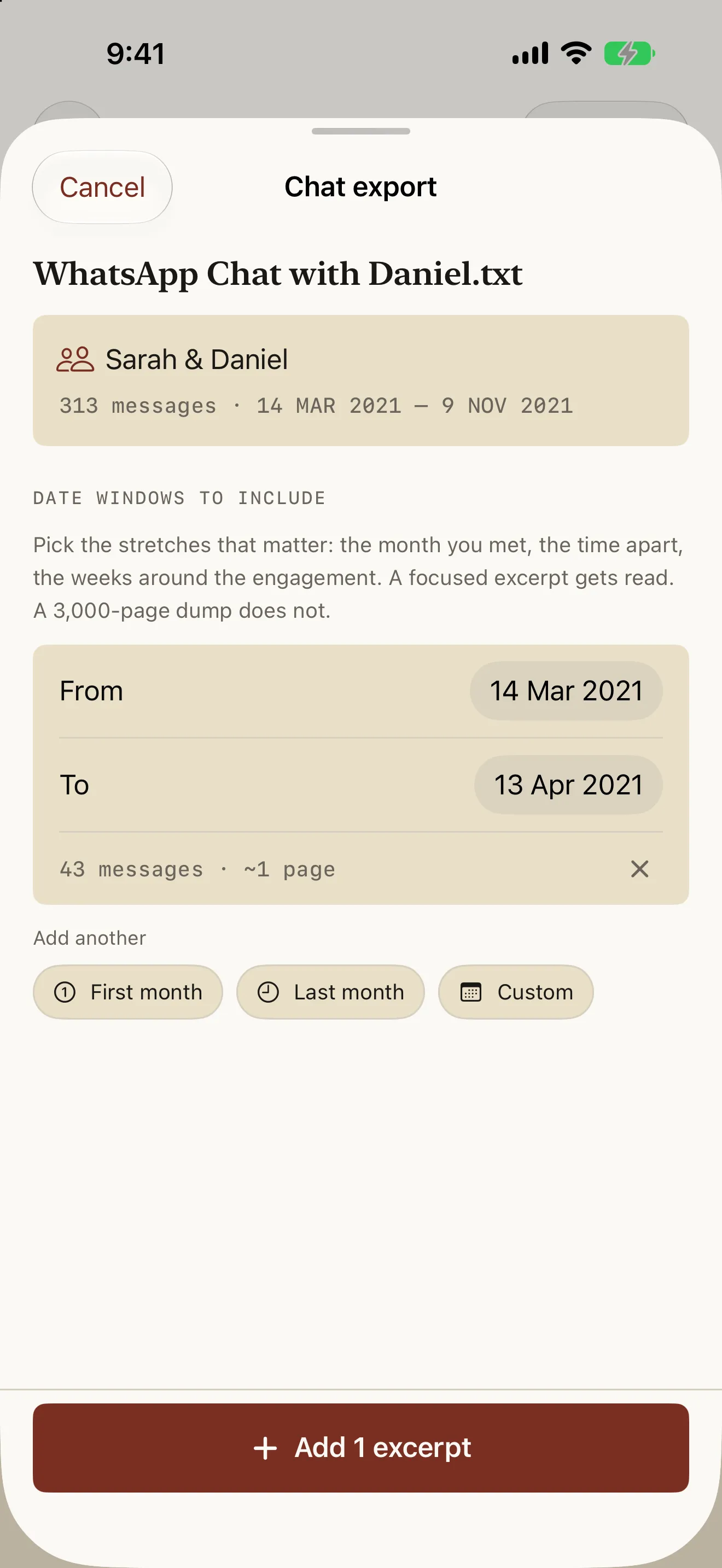
Import the .txt and Bona Fide parses it on the device, then asks which date windows to include instead of offering to swallow the log. Each window shows its message count and an estimated page count before you add it, and becomes its own labelled, numbered exhibit that sits in chronological order among your photos. Quick options cover the first month and the last month; custom ranges cover everything else.
The chat file, the parsed messages and the rendered PDF stay on your iPhone — there is no account, no upload and no server, and Settings › Delete all data removes all of it in one tap. Building the packet and paging through the finished document is free; export is a single $24.99 purchase. Bona Fide organizes and formats documents; it does not give legal advice or predict outcomes.