Relationship evidence packets — Photos and messages in, filing-ready PDF out — Nothing leaves your iPhone
Bona FideA dated, labelled evidence packet, built from what you already have.
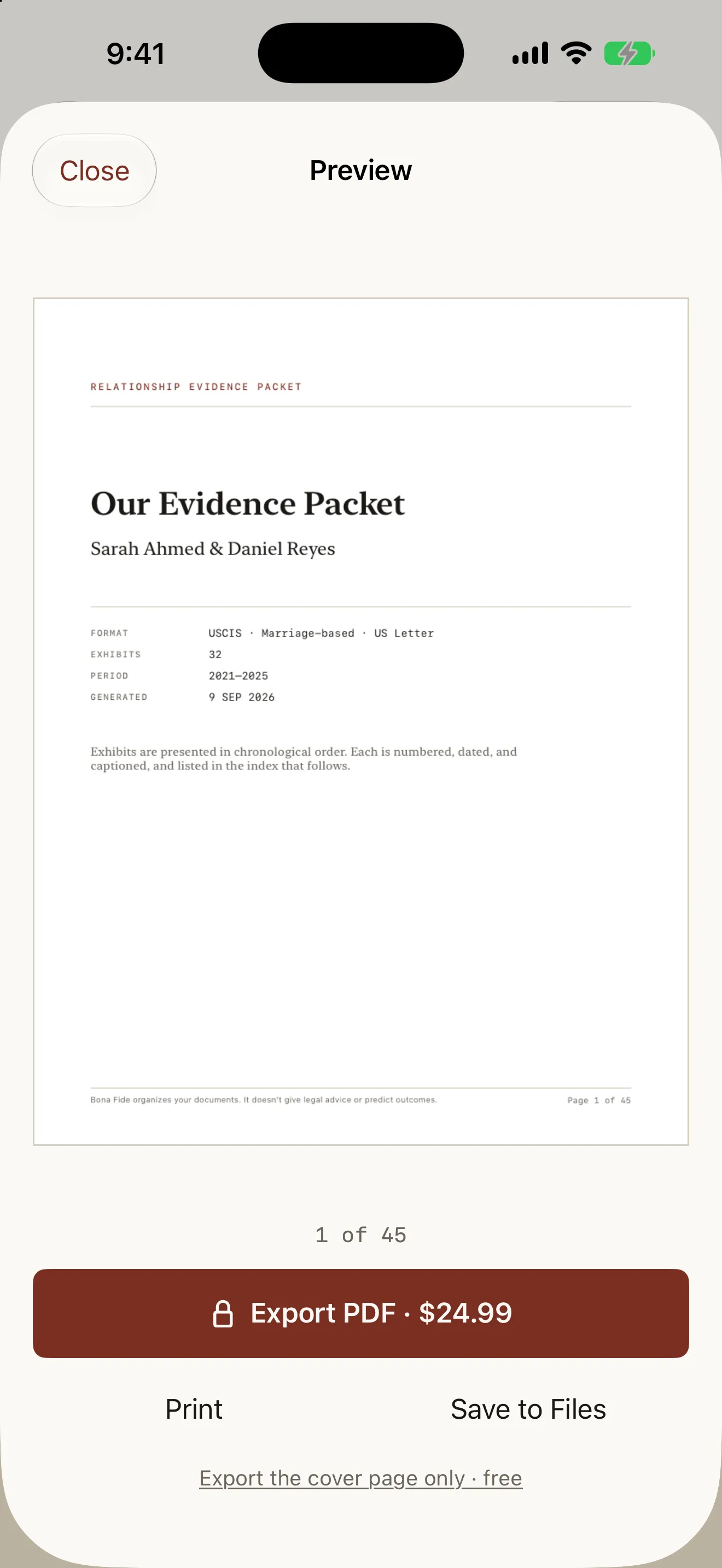
Bona Fide is a document builder for people assembling proof of a relationship for an immigration filing. You start a packet, name both partners as they appear on the paperwork, and pick the agency template — USCIS marriage-based, UK Appendix FM, or Canada IRCC, the last with an English / Français toggle that changes the exported document only. Then you import. Photos go through a visible processing pass that reads each one’s EXIF date and, where present, its GPS location, reverse-geocoded to a place name; you watch the rows tick over rather than staring at a spinner. Screenshots and images saved from messaging apps usually carry no date at all, so they go to a queue for you to fill in by hand — approximate is fine, and nothing is ever guessed. Messages come in as a WhatsApp .txt export, and instead of dumping the whole log, Bona Fide asks which date windows matter: the month you met, the stretch you were apart, the weeks around the engagement. Each window becomes its own labelled exhibit with an estimated page count you see before you add it, because a focused excerpt gets read and a three-thousand-page dump does not. Captions are the step that matters most, so the field is built for a sitting: write who, where and what, then swipe to the next exhibit without going back to the timeline. A summary bar shows how your exhibits spread across the categories commonly included in relationship evidence — cohabitation, travel, family and social, financial, communication, milestones — reported as counts, never as warnings about what is missing. Export renders real PDF pages you swipe through with a page counter: a cover page, an index of every exhibit with its number, date, description and page, then the exhibits themselves in chronological order, each labelled EXHIBIT 014 with its date, place and caption, and a disclaimer plus page number in every footer. The preview is always free and always complete — you page through the finished 45-page document before deciding to pay. A single $24.99 purchase, not a subscription, unlocks PDF export, printing and saving to Files for this packet and every packet you build; the cover page alone can be exported free so you can check the format against your printer or send a page to your attorney first. Family Sharing is on, because the two people filing are usually one household. All of it runs on the device: photos and messages are read on your iPhone and never sent anywhere, there is no account and no server, and Settings › Delete all data removes every packet, exhibit and image immediately.
Relationship evidence appMarriage-based green card evidenceI-130 evidence packetSpouse visa evidence PDFWhatsApp chat export as evidenceAppendix FM evidenceIRCC relationship proofOn-device, no account
v1.0Latest versionLive on the App Store
FreeFree to downloadNo in-app purchases
Productivity
The packet is the product
Bona Fide exists because the hardest part of proving a relationship is not having the evidence — it is turning four years of camera roll and a chat log into something a person at a desk can read in ten minutes. The default outcome is a shoebox: photos in whatever order they exported, a three-thousand-page message dump nobody opens, and captions that say "Photo 14". Every design decision follows from that. The rendered PDF page, not the app screen, is the hero of the product, because the document is what gets filed and the app is only the thing that made it. Dates are never invented: a screenshot with no EXIF goes to a queue and waits for a human, because a packet full of confidently wrong dates is worse than a packet with gaps. The chat importer refuses to offer "include everything" as a default, and shows the page count before the excerpt is added, because selection is the entire value. The category review reports what a packet contains and never says "Missing" or "Required" — the app is not in a position to tell anyone what their filing needs, and pretending otherwise would be both wrong and cruel to someone reading it at eleven at night. The paywall is the same argument: it appears only when you tap Export, after you have already paged through your finished document, and it says what you built — 45 pages, 32 exhibits, 2021–2025 — because that is the honest case for paying. No countdown, no discount on dismissal, no suggestion that paying improves an outcome, and no claim that the packet will be lost if you walk away. It will not be. And the privacy posture is not a feature line: people are being asked to hand over years of private messages, so the photos and the chat log are read on the device, never uploaded, and one tap in Settings ends it.
Import your photos and messages, and Bona Fide builds a dated, labelled evidence packet you can export as a PDF. Everything stays on your iPhone.
Key features
What Bona Fide does
01
A finished document, not a folder of photos
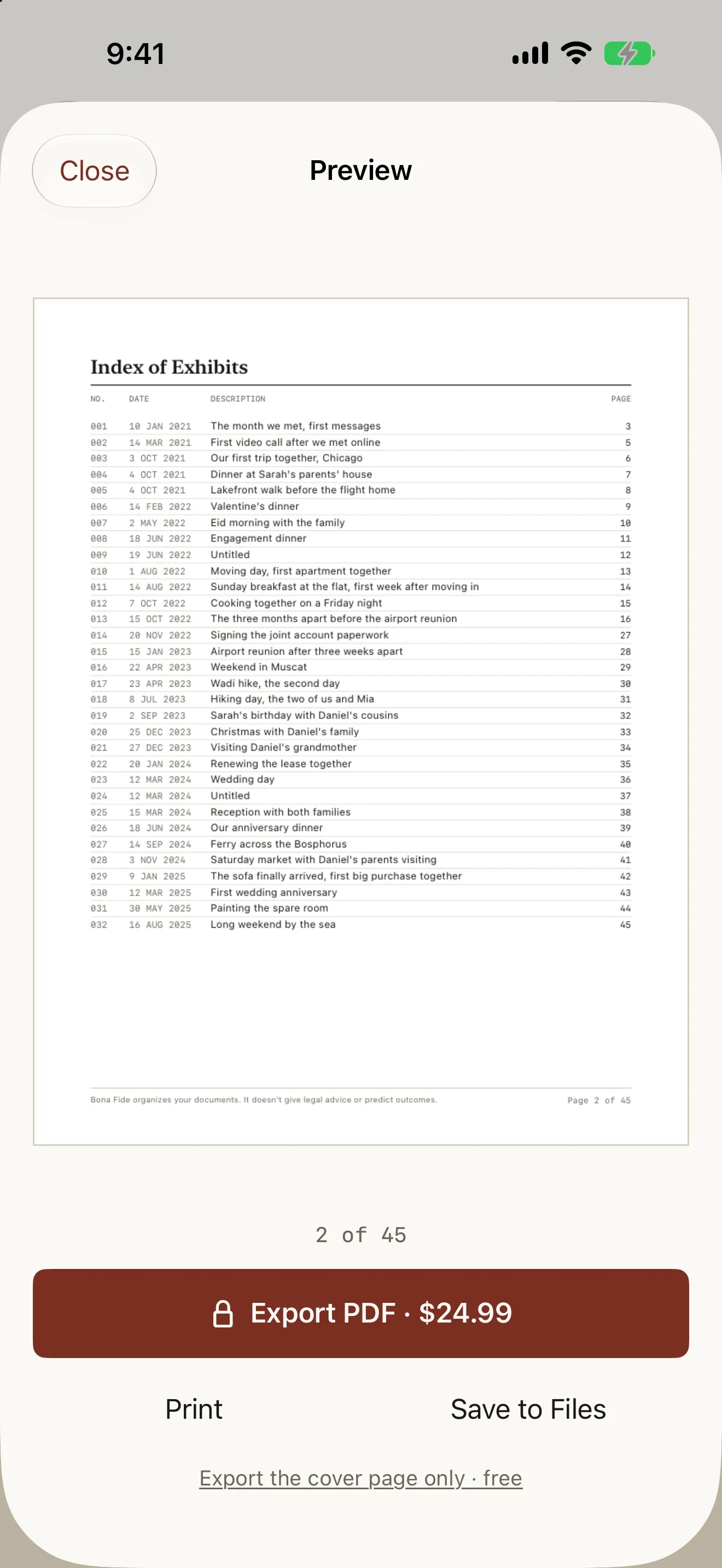
Export renders real PDF pages you swipe through with a page counter. A cover page with both names, the format and the date range; an index of every exhibit with its number, date, description and page; then the exhibits in chronological order, each labelled and captioned, with a disclaimer and page number in every footer. The preview is free and complete — you read the whole thing before you decide to pay.
02
Your photos, already in order
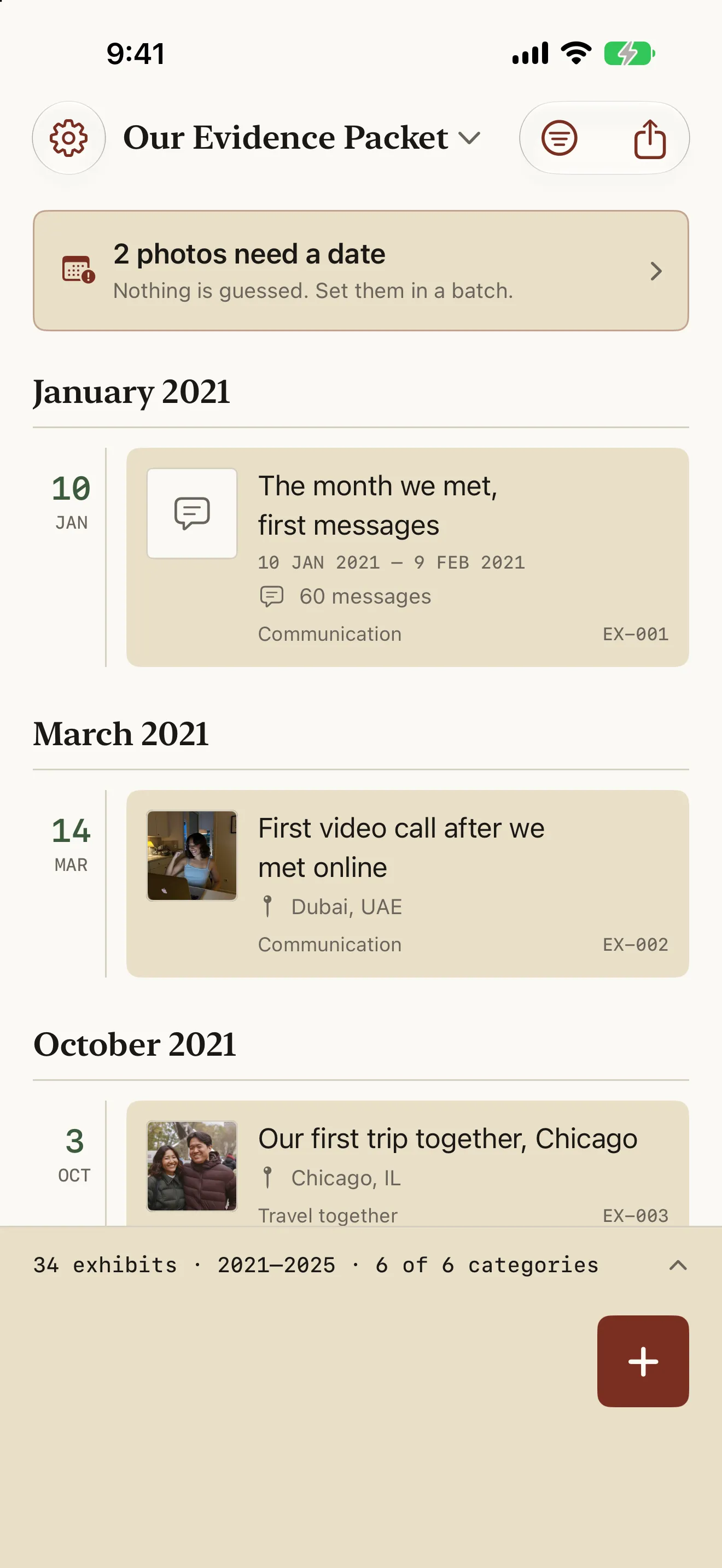
The timeline is the home screen: a date rail down the left, month headers, and one card per exhibit with its thumbnail, caption, place and mono exhibit number. It reads oldest to newest, because a packet is the story of a relationship over time. A summary bar at the bottom keeps count — 34 exhibits · 2021–2025 · 6 of 6 categories.
03
Dates and places read automatically
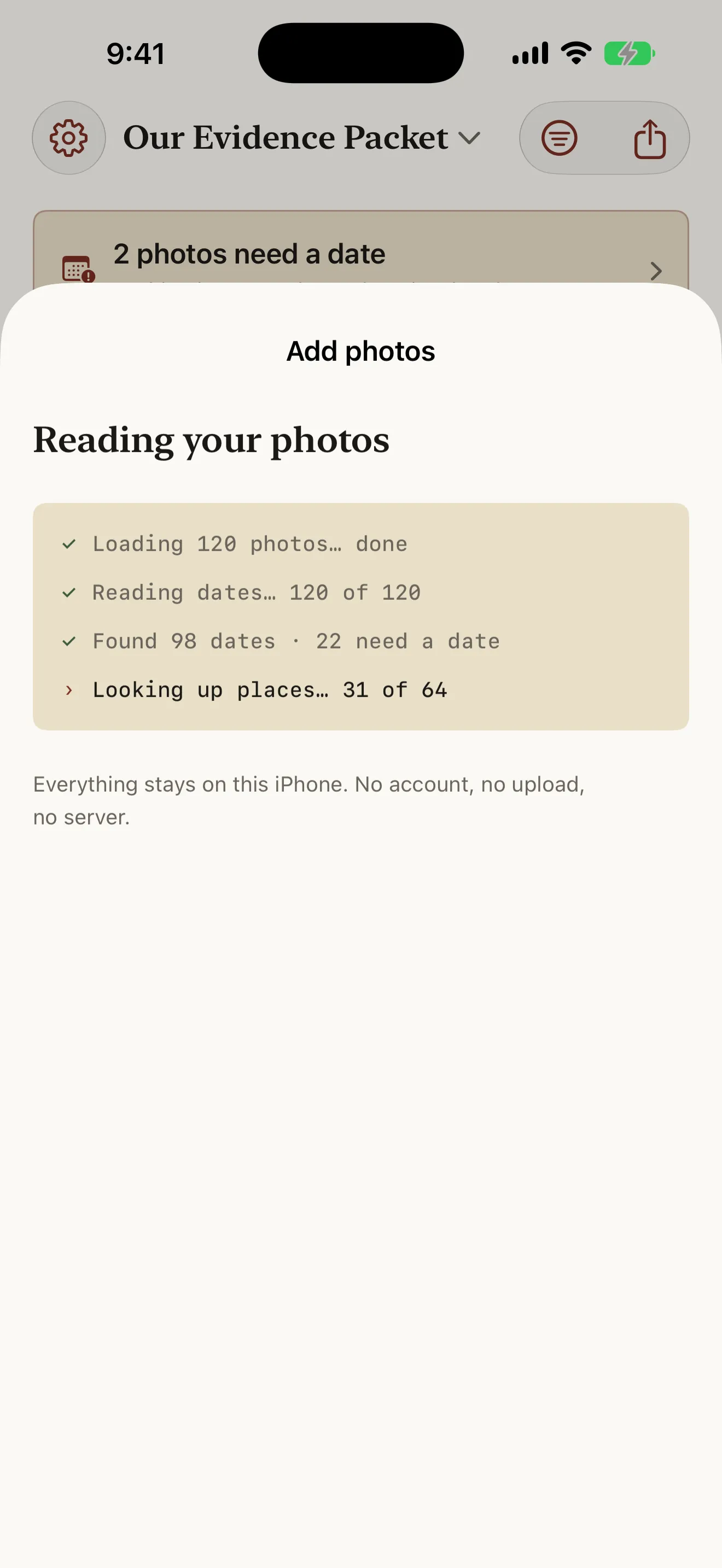
Importing shows you what is happening line by line rather than a spinner: photos loaded, dates read, dates found, places looked up. Each photo’s EXIF date becomes its exhibit date, and GPS coordinates are reverse-geocoded to a place name. Nothing else is read — no content analysis, no face detection.
04
Photos with no date wait for you
Screenshots, images saved from messages and anything shared through another app usually carry no date at all. Those go to a queue instead of silently taking today’s date, and you assign dates in batches — approximate is fine and far better than blank. The timeline says how many are waiting; nothing is ever guessed.
05
Messages that read like evidence
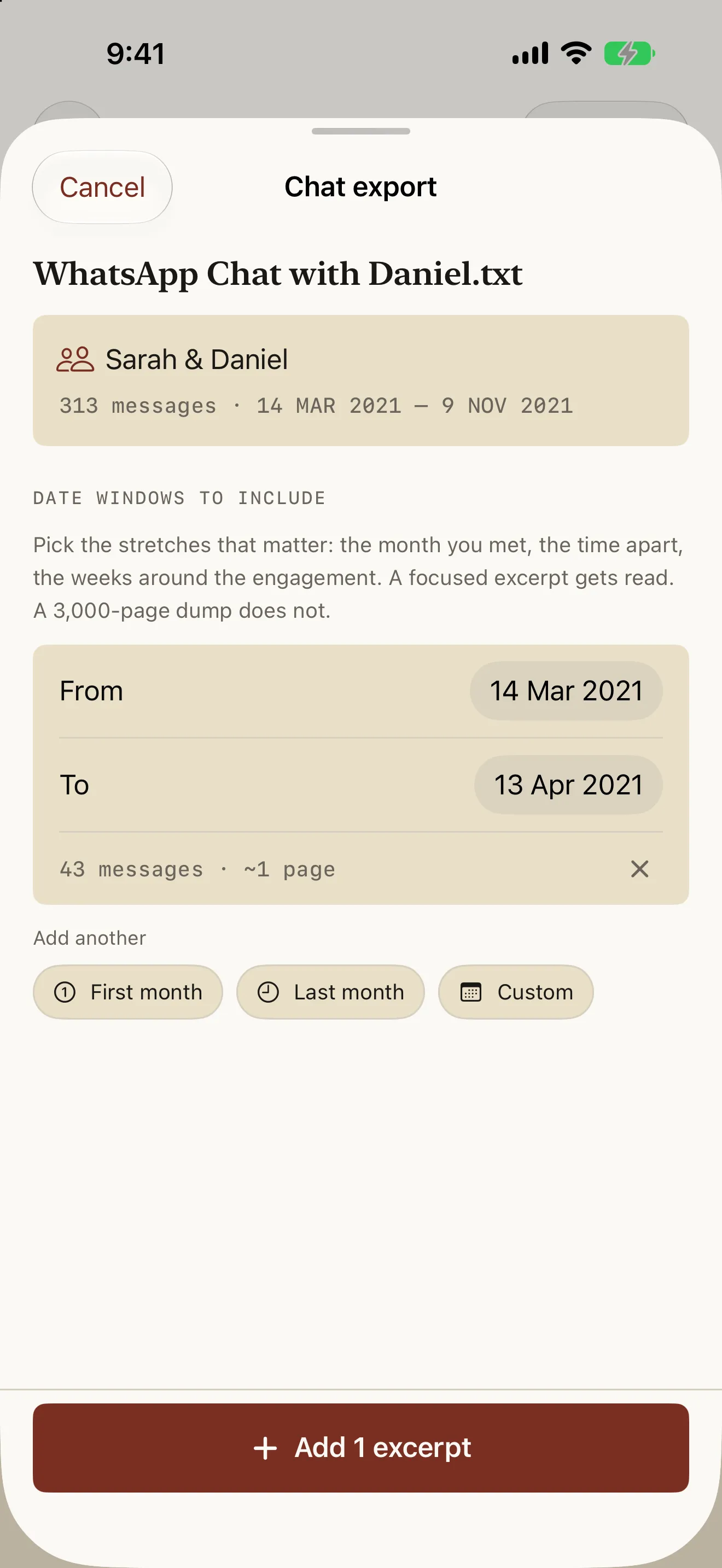
Import a WhatsApp .txt export and Bona Fide asks which date windows matter rather than swallowing the whole log: the month you met, the time apart, the weeks around the engagement. Each window shows its message count and estimated page count before you add it, and becomes its own labelled exhibit. A focused excerpt gets read; a 3,000-page dump does not.
06
Every exhibit labelled and indexed
The index page lists every exhibit by number, date, description and page, so whoever reads your packet can find the engagement dinner or the joint lease without paging through it. Exhibit numbers are assigned automatically and can be overridden, and an exhibit with no caption shows honestly as Untitled rather than being invented for you.
07
Captions, written in one sitting
Tap any exhibit to set its caption, date, place and category. The placeholder models what a useful caption looks like — "Our first trip to Chicago, at Sarah’s parents’ house" — because who, where and what is the difference between an exhibit and a picture. Swipe left and right to move between exhibits without returning to the timeline.
08
Coverage, reported not judged
The summary bar opens a review of how your exhibits spread across the categories commonly included in relationship evidence — cohabitation, travel together, family and social, financial, communication and milestones. Each row reads "Travel together — 12 exhibits", and an empty one reads "No exhibits yet". It never says Missing or Required, because requirements vary by agency and the app is not the one to tell you what yours needs.
09
Nothing leaves your iPhone
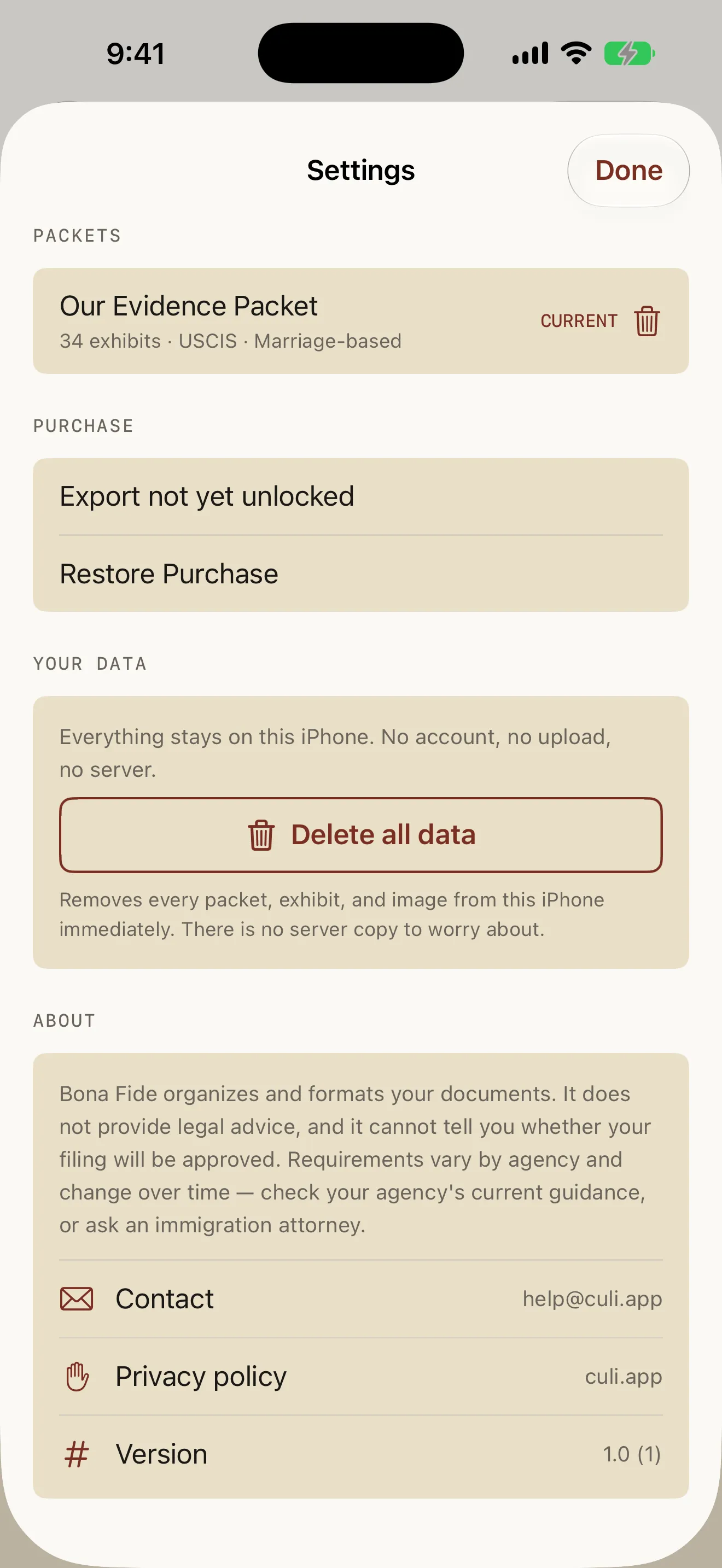
Photos, locations, chat exports and the rendered PDF are processed on the device. There is no account, no email and no server copy. Settings keeps your packets, the full disclaimer, contact and privacy links, and a Delete all data button that removes every packet, exhibit and image immediately — this is material many people want gone the moment the filing is in.
Who it's for
When people reach for Bona Fide
The camera roll that has to become a filing
Four years of photos, none in order and half of them screenshots. Import in batches, let the dates and places come off the photos themselves, fill in the queue by hand, and caption in one sitting. What comes out is a numbered, dated, indexed document instead of a folder someone else has to make sense of.
The chat log nobody will read
A WhatsApp export runs to thousands of pages, and submitting it whole is the same as submitting nothing. Pick the windows that carry the story — the month you met, the stretch apart, the weeks around the engagement — see each one’s page count before you add it, and file excerpts that are actually read.
Checking the format before you spend anything
Build the whole packet and page through the finished PDF for free, then export the cover page alone — unwatermarked, no payment — to check it against your printer or send it to your attorney. Only then decide whether to unlock export.
Pricing
What Bona Fide costs
Free
$0
no account, no time limit, nothing leaves your iPhone
Unlimited packets, photos and chat excerpts
Automatic dates and places from your photos
The missing-date queue, so nothing is guessed
Captions, categories and exhibit numbering
The complete rendered PDF, page by page
Export the cover page alone, unwatermarked
Delete all data in one tap
Recommended
Export Unlock
$24.99
one-time purchase — not a subscription, no trial
Export the full packet as a PDF
Print, and save to Files
Every packet you make, not just this one
Family Sharing enabled — a couple pays once
Restore Purchase on any device on your Apple Account
Everything in Free included
No renewal, no expiry, no upsell
Guides & resources
Bona Fide guides
Step-by-step answers to the questions people ask most about Bona Fide.
A single PDF. It opens with a cover page carrying the packet name, both partners’ names, the format and the date range, followed by an index listing every exhibit with its number, date, description and page. Then come the exhibits themselves in chronological order — photos and chat excerpts alike — each labelled EXHIBIT 014 with its date, place and caption, and every page carries a footer with the disclaimer and the page number. You can export it as a PDF, print it, or save it to Files.
Do my photos or messages ever leave my iPhone?
No. Photos are read from your library on the device, EXIF dates and GPS coordinates are extracted locally, chat exports are parsed locally, and the PDF is rendered locally. There is no account, no email address, no upload and no server holding your material. The only thing that ever leaves is the finished PDF, and only when you export, print or share it yourself.
How much does it cost?
Building a packet is free with no time limit: import as many photos and messages as you like, caption and categorize them, and page through the complete rendered PDF from cover to last exhibit. A single $24.99 purchase unlocks export, printing and Save to Files — for this packet and every packet you make afterwards. It is a one-time purchase, not a subscription, there is no trial to forget about, and Family Sharing is enabled so a couple pays once. You can also export the cover page alone, unwatermarked, for free.
Which filings does it format for?
USCIS marriage-based, UK Appendix FM and Canada IRCC. You pick the template when you create the packet, and it sets paper size, date style and the category names used in the review screen; the Canadian template adds an English / Français toggle that changes the exported document only. The template does not decide what goes in your packet — that is your call, and your agency’s current guidance is what governs it.
How do I get my messages out of WhatsApp?
Open the chat, tap the contact’s name, scroll to Export Chat and choose Without Media. Save the file to Files, then import it in Bona Fide with + › Chat export. The with-media version is a zip archive and is much larger; Bona Fide reads the .txt. iMessage has no user-accessible export, so it is not supported.
Will it include my entire chat history?
Not unless you ask for exactly that, one window at a time. After importing, you pick date ranges — the month you met, the year apart, the weeks around the engagement — and each range becomes its own labelled exhibit. The app shows the message count and estimated page count before you add it, so you can see what you are committing to. This is deliberate: a focused twenty-page excerpt gets read, and a three-thousand-page dump does not.
What happens to photos with no date?
They go to a queue rather than silently taking today’s date. Screenshots, images saved from messages and anything passed through another app usually have no EXIF date at all, which is common rather than an edge case. The timeline tells you how many are waiting, and you assign dates in batches — roughly right is fine, and far better than blank. Nothing is ever guessed for you.
Does Bona Fide tell me whether my evidence is enough?
No, and it will not pretend to. The review screen reports how your exhibits spread across the categories commonly included in relationship evidence — cohabitation, travel together, family and social, financial, communication, milestones — and shows each as a count, with "No exhibits yet" where there are none. It never marks anything Missing or Required. Requirements vary by agency and change over time; check your agency’s current guidance, or ask an immigration attorney.
Is this legal advice?
No. Bona Fide organizes and formats documents you already have. It does not give legal advice, does not interpret your agency’s requirements, and cannot tell you whether a filing will be approved. The disclaimer appears in onboarding, in Settings, and in the footer of every exported page. For advice about your filing, speak to an immigration attorney.
Can my partner build the packet with me?
Not in this version — one of you builds it. The other can share photos through Photos or Files first, and they import like any others. Shared packets are planned for a later release.
Can I make more than one packet?
Yes, one per filing. Switch between them by tapping the packet name at the top of the timeline, or from Settings › Packets. The export unlock covers all of them, not just the first.
How do I delete everything?
Settings › Delete all data removes every packet, exhibit and image from the device immediately. There is no server copy to chase, and deleting the app removes everything too. This is deliberately prominent rather than buried — a lot of people want this material gone the moment the filing is in.