Every widget free. One purchase for the rest. No subscription.
Soon turns waiting into something you enjoy. Add the thing you are looking forward to — a trip, a concert, a wedding, a due date, the end of exams — pick a date, and it appears on your Home Screen, your Lock Screen, and in StandBy. Every widget is free, because a countdown you have to open the app to see is not really a countdown. As the date approaches the countdown changes with it, and at halfway, one month, one week, single digits, tomorrow, and today Soon marks the moment with a short celebration and a share card made entirely on your iPhone. Switch any countdown to counting up and it tracks the days since instead — an anniversary, a milestone, the day something started. Arabic is written by a human, right-to-left everywhere including every widget, and any countdown can use the Hijri calendar so Ramadan and Eid roll forward on their own each year. Arabic and Hijri are never part of Pro. There are no accounts and no server of ours: countdowns live on your iPhone and sync privately through your own iCloud. Soon Pro is a single one-time purchase that adds all twelve themes, celebration sounds, extra share layouts, and extra widget styles.
3places it livesHome Screen, Lock Screen, and StandBy — plus Live Activities. Every widget size and family is free, because a countdown behind a paywall is not a countdown.
Oncenot monthlySoon Pro is a single one-time purchase for themes, celebration sounds, and extra share and widget styles. There is no subscription and there never will be for what is in the app today.
0accounts, ads or trackersNo sign-up, no advertising, and no server of ours. Your countdowns stay on your iPhone and sync privately through your own iCloud account.
Lifestyle
Built to be seen, not opened
Most countdown apps are built to be launched. Soon is built for the two seconds you spend looking at your Lock Screen, which is why every widget — Home Screen, Lock Screen, StandBy, and Live Activities — is free and always will be. Putting the widget behind a paywall is the single most common mistake in this category, and it is the one thing that makes the product pointless. The second thing this category gets wrong is Arabic: it is almost always bulk-translated, with right-to-left layouts that break the moment a number appears and Hijri dates you still have to look up yourself. Soon treats Hijri as a real calendar in the data model, not a display filter, so a Ramadan countdown set once rolls forward every year without you touching it. Both of those decisions cost revenue on paper. Together they are the product.
Screenshots
See Soon in action.
Key features
What makes Soon stand out.
01
Soonest first, always
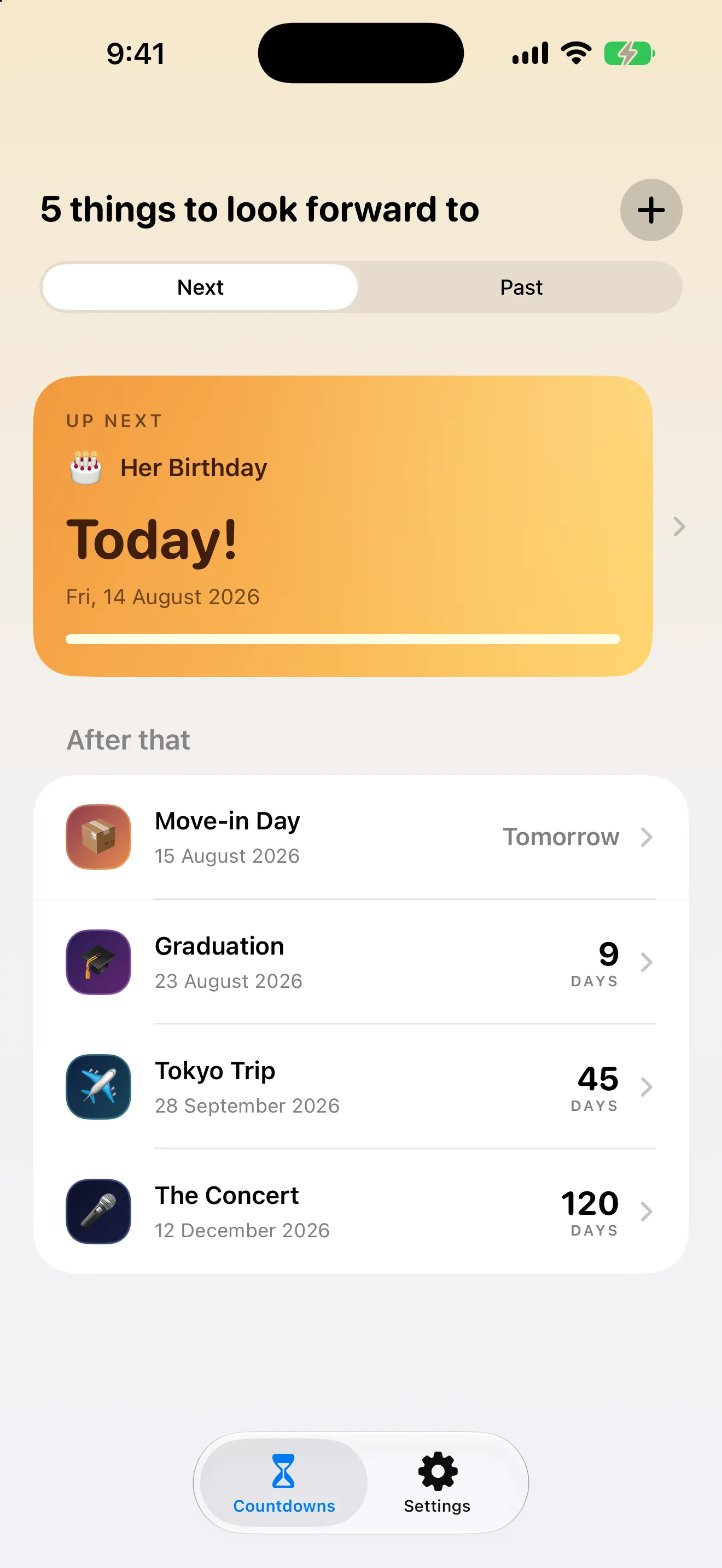
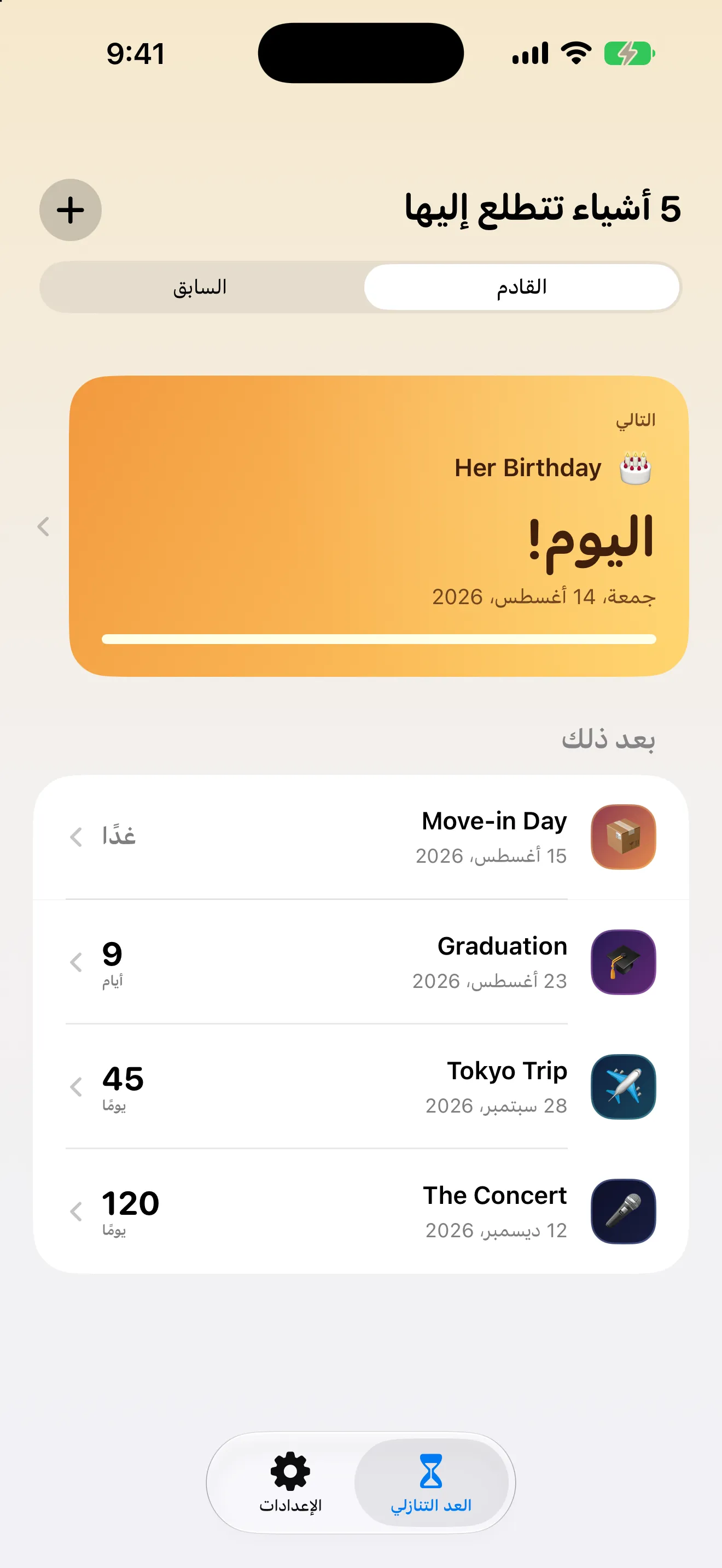
One quiet list: what is up next in a full-width card, everything after it below, sorted by how close it is. Past countdowns move themselves into the Past segment at local midnight, so the list only ever shows what you are still waiting for.
02
The screen people screenshot
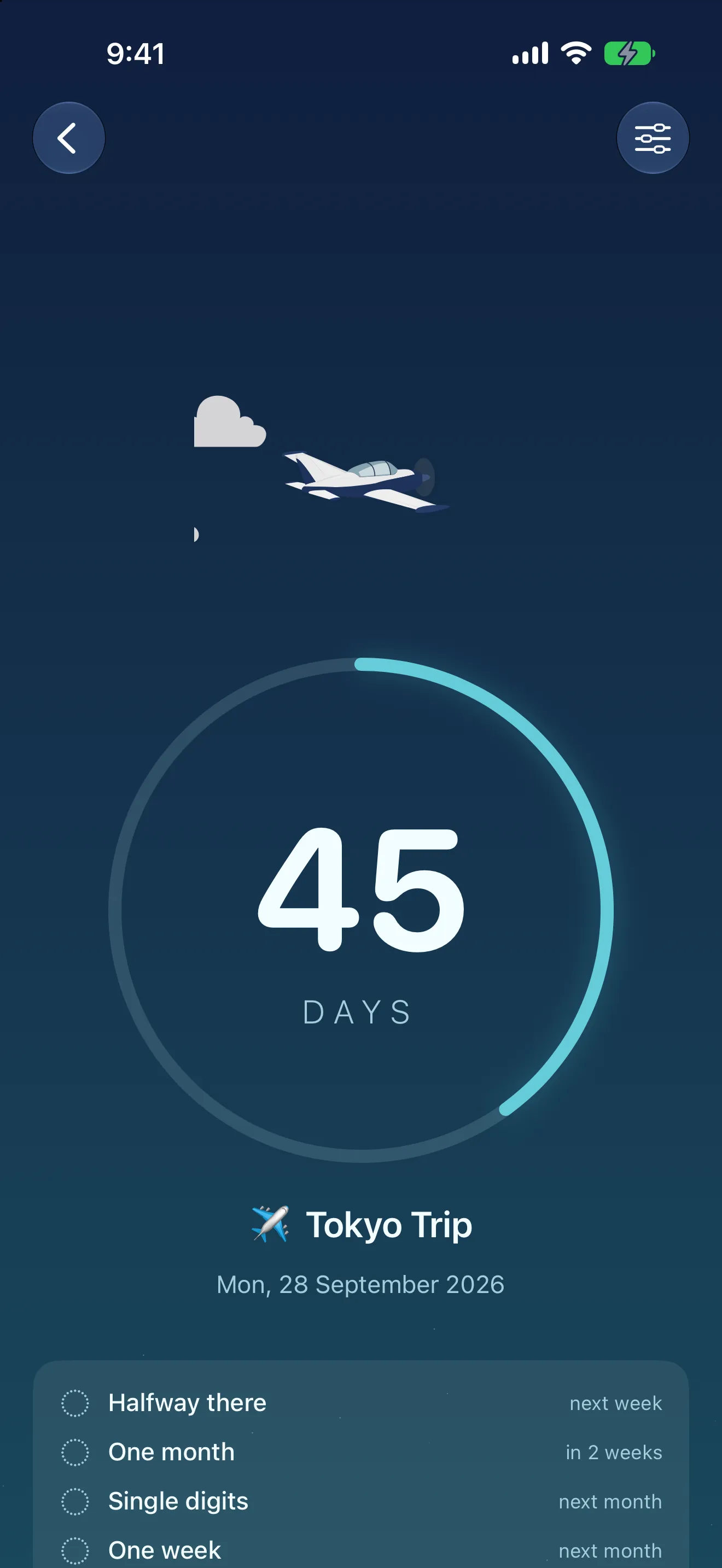
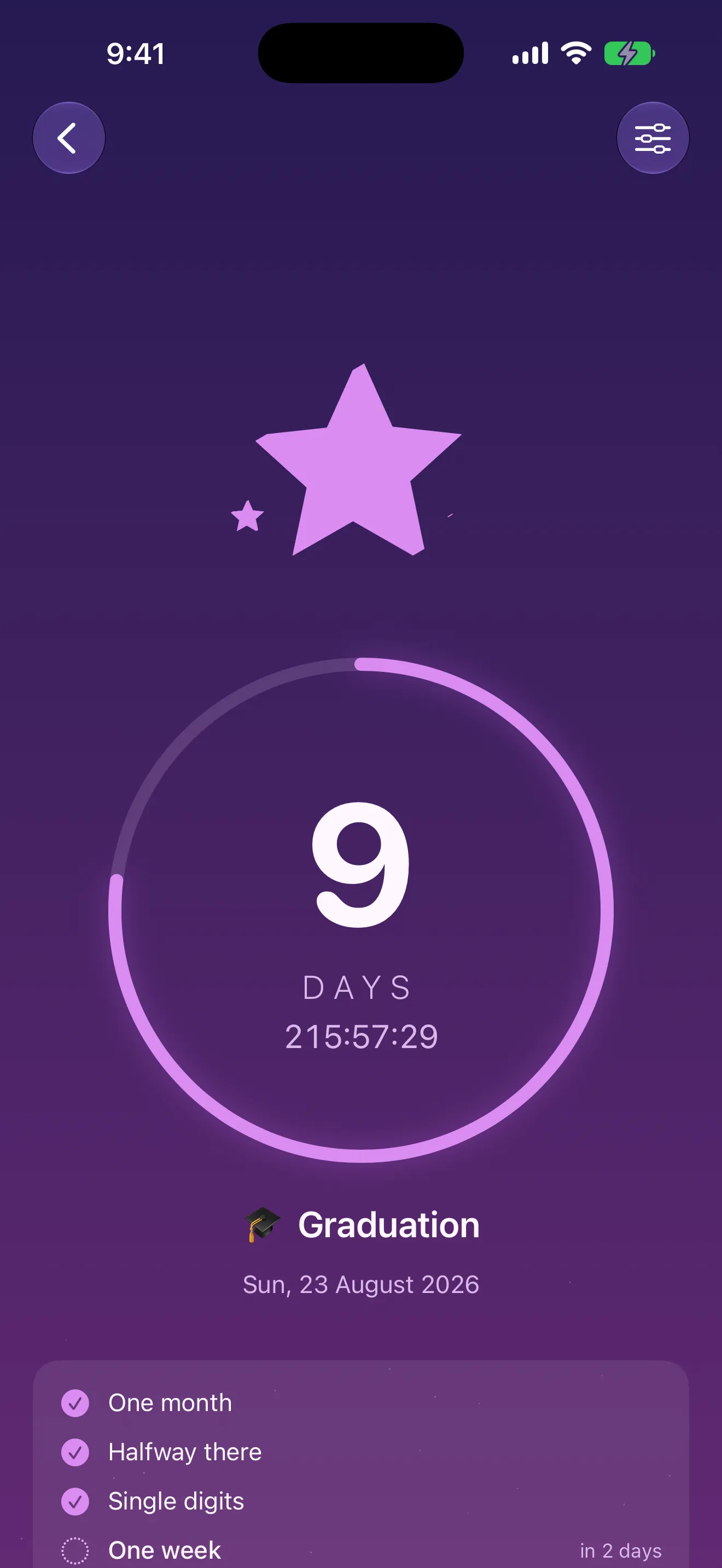
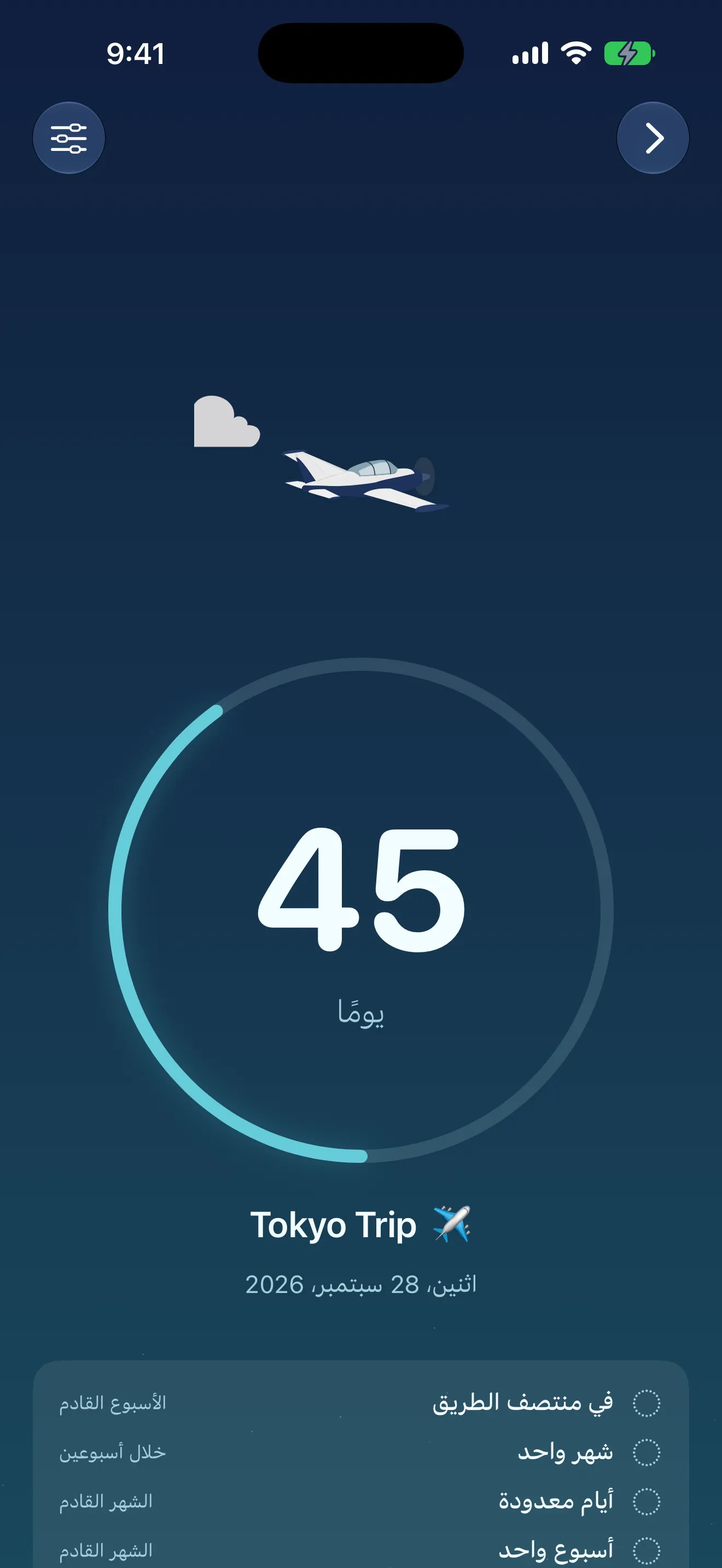
A huge day count inside a ring that fills as the wait goes by, an ambient scene that shifts with the theme and the distance, the date in full, and the moments still to come. Day rollovers animate; hours and minutes tick live underneath.
03
Moments along the way
Halfway, one month, one week, single digits, tomorrow, today. Each fires once and only once, so you get a payoff on the way instead of a single anticlimax at the end — and you can see which are done and which are still coming.
04
A celebration you can send
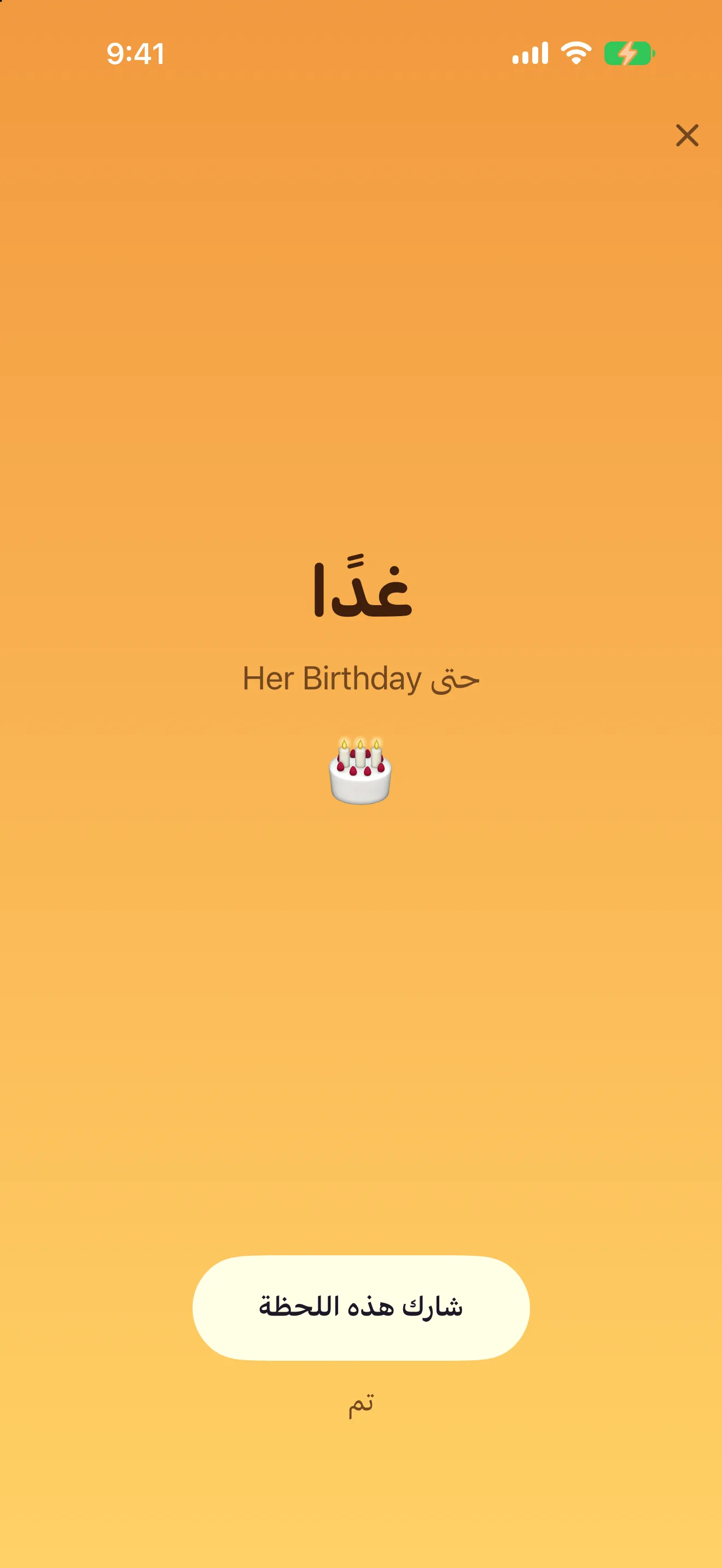
When you cross a moment, Soon opens with a short celebration — never mid-task, never more than one per launch, and quietly if you have Reduced Motion on. Tap share and the card is rendered on your iPhone and handed straight to the share sheet. Nothing is uploaded.
05
Arabic and Hijri, free forever
Arabic throughout the app and on every widget, right-to-left, written rather than machine-translated. Set any countdown to the Hijri calendar and it rolls forward to the next occurrence on its own — Ramadan, Eid al-Fitr, Eid al-Adha, the Islamic New Year, and the Day of Arafah are ready-made. None of it is behind Pro.
06
Themes that move with the date
A theme is not just a colour — it changes state as the day gets closer, so ninety days out looks nothing like nine. Four themes are free; Soon Pro unlocks all twelve plus everything added later. Every theme is built right-to-left as well as left-to-right.
Who it's for
Built for real workflows.
Trips, concerts and the big day
Book something four months out and watch it get closer on your Lock Screen every day, with a payoff at halfway, one month, one week, and single digits instead of one long silence.
Ramadan, Eid and the Hijri calendar
Set a Hijri countdown once and it rolls forward on its own every year. Full Arabic and right-to-left on every widget, with a day of adjustment when your local moon sighting differs.
Days since, not just days until
Flip a countdown to counting up for an anniversary, a graduation you already had, a sobriety date, or the day something began — and keep it on your Home Screen the same way.
Pricing
Simple, honest pricing.
Free
$0
forever, no account
Unlimited countdowns
Every widget: Home Screen, Lock Screen, StandBy
Live Activities
Counting down and counting up
Arabic, right-to-left, and the Hijri calendar
All moments and celebrations
Share cards
No ads, no account, works offline
Recommended
Soon Pro
One-time
a single purchase — never a subscription
All twelve themes, plus every theme added later
Sound for your celebration moments
Extra share card layouts
Extra widget styles
Everything in Free included
Restores free on any iPhone with your Apple Account
Guides & resources
Soon guides for iPhone.
Practical reads that answer common search questions — each links back to the app.
No. Soon is free to use with unlimited countdowns, and Soon Pro is a single one-time purchase — buy it once and keep it forever, on any iPhone signed into your Apple Account. There is no subscription and there will not be one for what is in the app today. If you get a new phone, Settings → Restore Purchase brings Pro back at no charge.
Are the widgets free?
Yes, all of them. Home Screen, Lock Screen, StandBy, and Live Activities are free in every size, and they always will be. Soon is designed to be seen rather than opened, so putting the widget behind a paywall would defeat the point of the app. Pro adds extra widget styles, not widget access.
How do I add the widget to my Lock Screen?
Touch and hold your Lock Screen, tap Customize, choose Lock Screen, then tap a widget slot and pick Soon. Choose which countdown it should show. For the Home Screen, touch and hold an empty area until the apps jiggle, tap Edit → Add Widget, search for Soon, pick a size, then touch and hold the new widget and choose Edit Widget to select the countdown. Once a Soon widget is on your Home Screen it is available in StandBy too.
Does Soon support Arabic and the Hijri calendar?
Yes, and both are free — they are never part of Pro. The whole app and every widget are available in Arabic, right-to-left, with strings written by a person rather than machine-translated. Any countdown can be set to the Hijri calendar, and Hijri-dated events roll forward automatically each year, so a Ramadan countdown set once never needs looking up again. Ready-made countdowns are included for Ramadan, Eid al-Fitr, Eid al-Adha, the Islamic New Year, and the Day of Arafah.
Are the Hijri dates exact?
They are calculated dates, and the start of an Islamic month can depend on local moon sighting, so it may differ by a day between countries and authorities. Soon shows the calculated date and lets you adjust any Hijri countdown by a day to match your local announcement. It is not intended as a religious authority — check your local announcement when the day matters.
Can I count up as well as down?
Yes. Switch any countdown to counting up and Soon tracks the days since instead — an anniversary, a milestone you have passed, a day you quit something, the day something started. You can switch between counting down and counting up at any time, and count-up events never move to Past, since counting the time since is their whole purpose.
Will Soon send me notifications every day?
No. The only notifications are the moments — halfway, one month, one week, single digits, tomorrow, and today — each fires once per countdown, and even those are opt-in. Widgets refresh at midnight in your time zone without notifying you; if one ever looks stale, opening Soon refreshes it.
Where do my countdowns live, and what data do you collect?
None of it reaches us. Soon has no accounts, no sign-up, and no server of ours. Countdowns are stored on your iPhone and sync privately through your own iCloud account, which Culi Studio cannot see. Share cards are rendered on your device and handed to the iOS share sheet — nothing is uploaded. Turn iCloud off and Soon still works; everything simply stays on the one device.
Can I share a countdown with someone so we both see it?
Not yet. It is the most-requested feature and it is what we are working on next. For now you can share a countdown as a card — Hero, Minimal, or a 9:16 Story layout — to Messages, Instagram Stories, or anywhere else.
Does Soon work on iPad or Apple Watch?
Not yet — Soon is iPhone-only for now. It does work completely offline on iPhone, including every widget.